Most people who want to start a YouTube channel hit the same wall: they don’t want to be on camera, or they hate the sound of their own voice on recordings, or they simply don’t have a quiet space to record clean audio. In 2026, none of that is a reason to hold back. AI voiceover for YouTube has matured to the point where synthetic voices sound genuinely human — and for most niches, viewers either can’t tell the difference or simply don’t care. This guide covers everything you need to know: the best tools, a real workflow, and how to get a professional-quality voiceover in under five minutes.
Why AI Voiceover for YouTube Is a Game Changer in 2026
Not long ago, “AI voice” meant robotic, monotone audio that sounded like it belonged in a 1990s phone menu. That era is over. The latest generation of AI voice models — trained on thousands of hours of natural human speech — can deliver pacing, emotion, emphasis, and even subtle breathiness that makes them nearly indistinguishable from a real recording. For YouTube creators, this shift has massive implications.
The practical benefits go well beyond just avoiding a microphone. AI voiceover eliminates recording retakes. It removes background noise issues entirely. It lets you publish in multiple languages with a single click. It scales with your content — if you’re running a faceless channel and need five videos a week, you don’t need five recording sessions. You just generate five voiceovers.
For creators building automated channels — the kind we cover in our post on how to build a 7-agent Telegram bot that automates your entire YouTube channel — AI voiceover is a non-negotiable part of the stack. Without it, you still have a manual bottleneck right before the finish line.
Best AI Voiceover Tools Compared (ElevenLabs, Murf, Play.ht)
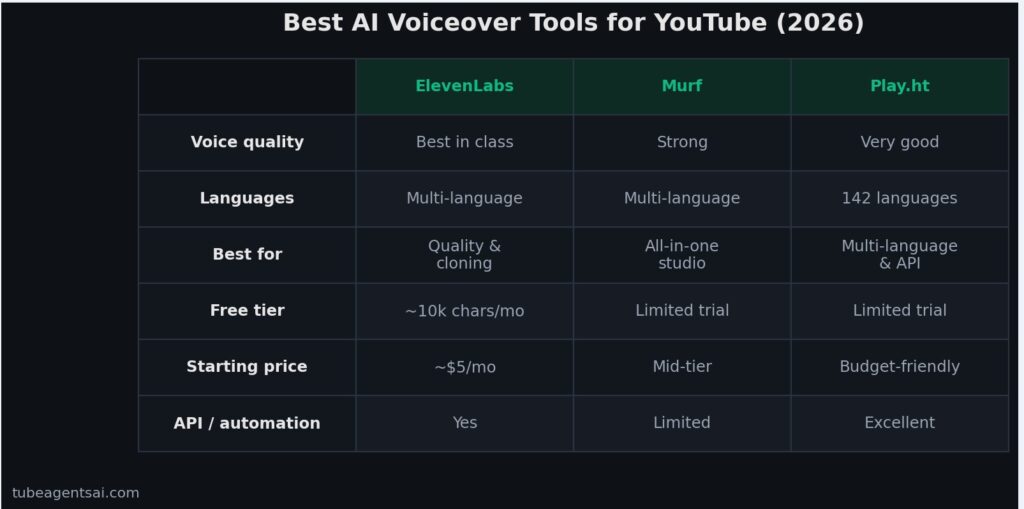
There are dozens of AI voice generators available in 2026, but three consistently rise to the top for YouTube creators: ElevenLabs, Murf, and Play.ht. Here’s an honest comparison of each.
ElevenLabs
ElevenLabs is the current industry benchmark for voice quality. Its flagship models produce speech that is difficult to distinguish from a real human recording — even at normal listening distance without headphones. The voice library includes hundreds of preset voices across accents and styles, and the voice cloning feature lets you create a custom voice from as little as one minute of audio.
For YouTube, ElevenLabs works best for narration-heavy videos where voice quality is central to the viewing experience — think documentary style, educational content, or high-end explainers. The free tier is limited to roughly 10,000 characters per month, which is enough to test but not enough to run a consistent channel. Paid plans start at around $5/month for the Starter tier.
Best for: Quality-focused creators, voice cloning, multi-language output.
Murf
Murf takes a slightly different approach, positioning itself as a full studio tool rather than just a voice generator. It includes a built-in editor where you can sync your voiceover with video, adjust pacing at a word level, and layer in background music. For creators who want an all-in-one solution without jumping between five different apps, Murf is genuinely useful.
Voice quality is strong — not quite at ElevenLabs’ level for subtle emotional nuance, but more than sufficient for the vast majority of YouTube content. The platform also has one of the largest libraries of voice styles, including options specifically designed for advertisement, podcast, and e-learning tones.
Best for: Creators who want voiceover + basic editing in one place, corporate or educational content.
Play.ht
Play.ht offers a solid middle ground between quality and price. It supports over 900 voices across 142 languages, which makes it particularly powerful for channels targeting non-English audiences. The ultra-realistic voice models are competitive with ElevenLabs for many content types, and the API access — even on lower-tier plans — makes it a favorite for developers building automated pipelines.
If you’re building a multi-language faceless channel or integrating voiceover into a larger automation workflow, Play.ht’s API flexibility makes it worth serious consideration.
Best for: Multi-language channels, API integration, automation pipelines.
How @AIYouTubeConveyerBot Handles Voiceover Automatically
Choosing a voiceover tool is one thing. Integrating it into a repeatable content workflow is another. This is where most creators stall — they sign up for ElevenLabs, generate a few voiceovers manually, and then realize they’ve just replaced one manual step with a slightly more convenient manual step.
@AIYouTubeConveyerBot on Telegram solves this by handling voiceover as part of a complete content pipeline, not as a standalone task. Here’s what happens when you submit a video topic to the bot:
- The bot generates a full YouTube script optimized for your niche and target keyword (see our guide on how to generate YouTube scripts automatically for more detail on this step).
- Once the script is confirmed, the bot sends it through an integrated AI voice model — no separate login, no copy-paste, no API setup on your end.
- You receive the audio file directly in Telegram, ready to drop into your video editor.
- The same session also produces a video title, SEO description, thumbnail brief, and tags — the entire asset set for one upload.
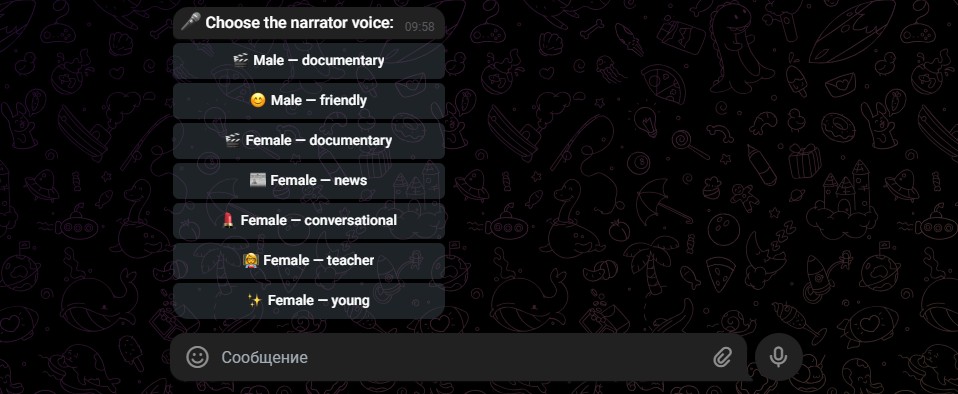
This is what separates a real automation tool from a collection of individual AI apps. The voiceover isn’t generated in isolation — it flows naturally from the script, and the whole package arrives together. For creators running high-volume channels, this workflow is the difference between sustainable output and constant context-switching between tools.
If you’re curious about what the full automated channel setup looks like — beyond just voiceover — the best AI bot for faceless YouTube channels breakdown covers the complete picture with real channel results.
Step-by-Step: Get a Pro AI Voiceover in Under 5 Minutes
Whether you’re using a standalone tool like ElevenLabs or the integrated workflow through @AIYouTubeConveyerBot, here’s the exact process to go from script to polished audio in under five minutes.
Step 1: Prepare Your Script (1 minute)
AI voice generators perform best when your script is clean and punctuated correctly. Read through your script and make sure sentences are properly ended, pauses are indicated with commas or ellipses, and any unusual proper nouns (brand names, technical terms) are spelled phonetically if needed. A script that reads well to a human will sound natural in AI voice. A script full of abbreviations, broken sentences, and bullet points will produce choppy, unnatural audio.
Step 2: Choose Your Voice and Tone (30 seconds)
Select a voice that matches your channel’s personality. A calm, measured voice works well for educational content. An upbeat, slightly faster voice suits entertainment or reaction-style formats. A deeper, more authoritative voice fits documentaries or investigative content. Most AI tools let you preview voices before committing — spend 30 seconds on this rather than defaulting to whatever the platform suggests.
Step 3: Generate and Preview (1–2 minutes)
Paste your script and generate. Listen to the first 30 seconds carefully before downloading the full file. Check for mispronounced words, awkward pauses, or sections where the pacing rushes or drags. Most tools let you re-generate specific segments without re-doing the entire script — use this feature rather than regenerating everything when one sentence sounds off.
Step 4: Adjust Pronunciation and Pacing (1 minute)
If any words are mispronounced, use the platform’s pronunciation editor (most major tools have one) or simply respell the word phonetically in your script. For pacing issues, add commas or line breaks to create pauses, or use SSML tags if the tool supports them. A 10-second adjustment here saves far more time than re-editing in your video editor later.
Step 5: Export and Use (30 seconds)
Export in MP3 or WAV format depending on your video editor’s preference. WAV gives you lossless quality for further processing; MP3 is fine if you’re dropping the audio straight into a timeline without additional compression. Name your file clearly (e.g., “video-title-voiceover-v1.mp3”) and you’re done.
Tips for Natural-Sounding AI Voice
Even with the best AI voice generator, the difference between output that sounds robotic and output that sounds human often comes down to how you write and format your script. These are the techniques that consistently improve AI voice quality without any extra cost or tooling.
Write conversationally, not formally. AI voices handle contractions better than rigid formal sentences. “You’re going to want to avoid this” sounds more natural than “You will want to avoid this.” Write the way you’d actually say something out loud, not the way you’d write an email.
Use punctuation to control pacing. Commas create brief pauses. Ellipses create longer ones. Em dashes — like this — create a mid-sentence pause that works well for emphasis. If you want the AI to breathe naturally between key points, structure your sentences to give it room to do so.
Avoid long unbroken sentences. A single sentence that runs for four lines will almost always sound rushed or unnatural in AI voice. Break it into two or three shorter sentences. The voice model processes punctuation as its guide for rhythm — longer sentences with fewer stops produce longer, breathless-sounding runs of audio.
Test pronunciation before full generation. If your video includes technical terms, brand names, or industry jargon, test those specific words in a short preview before generating the full script. Catching a mispronounced word early is much easier than finding it at the end of an 8-minute audio file.
Match voice style to content mood. If your video is about a serious topic — financial advice, medical information, historical events — avoid using a cheerful or upbeat voice preset. The mismatch between tone and delivery is immediately noticeable to viewers, even if they can’t articulate why something “feels off.”
Re-generate sparingly. It’s tempting to keep regenerating hoping for a “better” version, but AI voice output is probabilistic — you might get slightly different results each time, but rarely dramatically better ones. If a section sounds slightly off, adjust the script text rather than repeatedly regenerating and hoping for improvement.
Conclusion: AI Voiceover for YouTube Is Ready — Are You?
The barrier to creating professional-sounding YouTube content without recording a single word of audio has never been lower. AI voiceover for YouTube in 2026 delivers quality that was reserved for professional studios just a few years ago, and it does it in minutes rather than hours. Whether you use ElevenLabs for premium quality, Murf for an integrated studio experience, or Play.ht for multi-language scale — the technology is genuinely ready for production use.
The real efficiency leap, though, comes when voiceover is part of a larger automated workflow rather than a standalone task. When the same tool that generates your script also delivers your voiceover, your title, your description, and your tags — all in a single session — you go from spending a full day on one video to publishing multiple videos a week without burning out.
That’s exactly what @AIYouTubeConveyerBot is built to do.
👉 Try @AIYouTubeConveyerBot free on Telegram — get your first AI voiceover-ready script delivered in under 2 minutes.