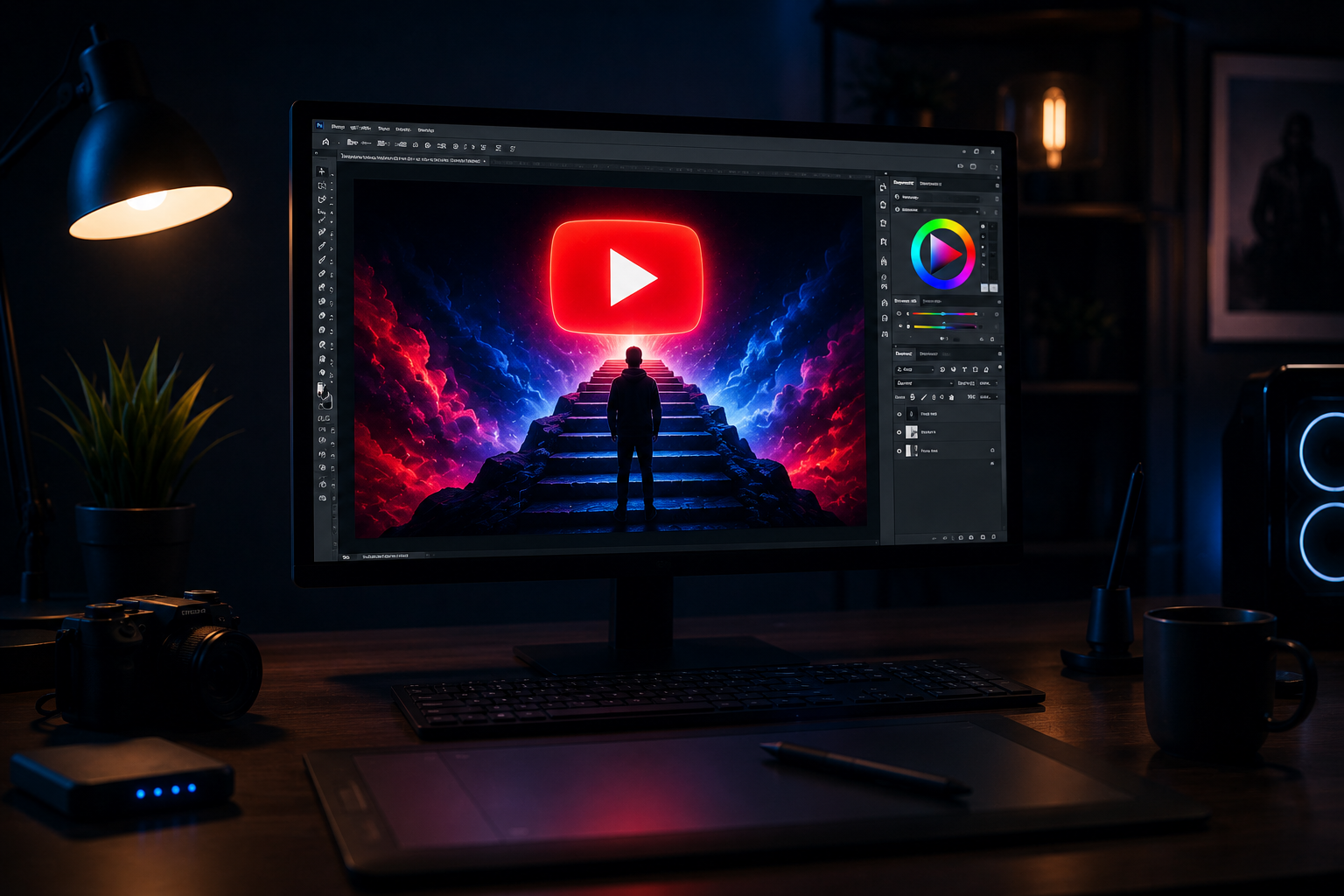
You can have the best video on YouTube and still get zero clicks if the thumbnail doesn’t stop the scroll. Research consistently puts thumbnail CTR as one of the top three factors the YouTube algorithm uses to decide how widely to distribute a video — and creators who understand this treat thumbnail design as seriously as content quality. The good news: AI thumbnail generators for YouTube have reached a quality level in 2026 where a solo creator with no design background can produce scroll-stopping thumbnails in under ten minutes. This guide covers what actually works, which tools to use, and how to build thumbnail creation into an automated workflow.
What Makes a YouTube Thumbnail Actually Work in 2026
Before touching any AI tool, it’s worth understanding what makes a thumbnail perform. The mechanics haven’t changed dramatically, but the competitive environment has — every niche now has more content competing for the same viewer attention, which means the bar for a “good” thumbnail is higher than it was two years ago.
Contrast and visual clarity at small sizes. Most viewers encounter your thumbnail at roughly 180×100 pixels on mobile — about the size of a postage stamp. If the thumbnail isn’t instantly readable at that size, it won’t get clicked. High-contrast color combinations (dark text on light backgrounds, or bright accents on dark backgrounds) and simple compositions with one or two focal elements consistently outperform cluttered, detail-heavy designs.
A clear emotional signal. The best thumbnails communicate an emotion before a viewer consciously reads the text — curiosity, surprise, urgency, or excitement. This is why faces with strong expressions historically perform well; the human brain processes emotional facial cues faster than text. For faceless channels, bold visual metaphors and high-contrast color fields can replicate this emotional signal without a person in frame.
Text that adds information, not repetition. Thumbnail text should add context that isn’t already obvious from the visual — not repeat the video title. If your thumbnail shows a shocked face, the text doesn’t need to say “SHOCKING.” It should tell the viewer what specifically is shocking. Three to five words of tight, high-contrast text typically outperform longer copy.
Brand consistency. Channels with high subscriber loyalty often use recognizable thumbnail templates — consistent color palette, font, and layout — so regular viewers can identify their videos at a glance in a crowded feed. This consistency builds recognition over time and increases click rates from existing subscribers, which is a separate but important signal from new-viewer CTR.
Best AI Thumbnail Generators for YouTube Compared (Canva AI, Adobe Firefly, Midjourney)
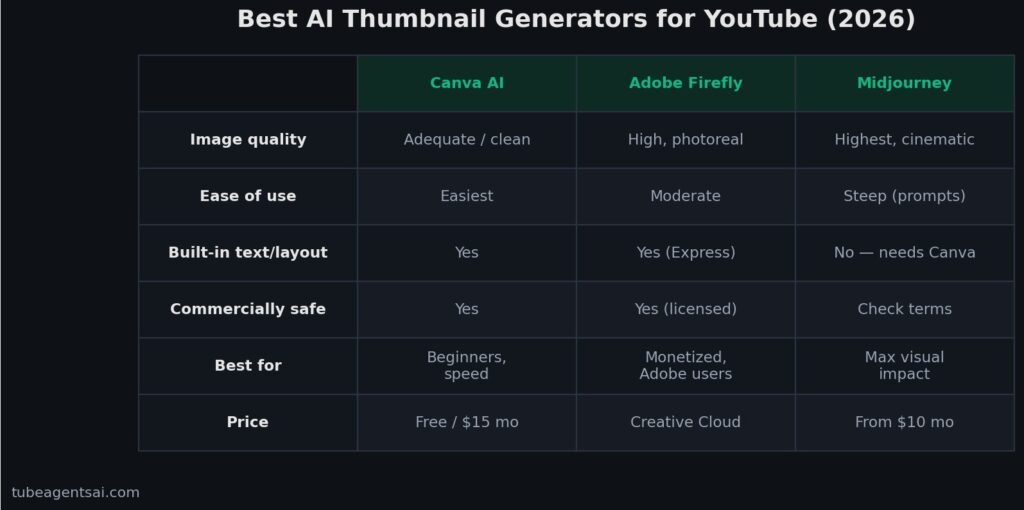
Three AI tools dominate thumbnail creation workflows in 2026, each with a different strength profile.
Canva AI
Canva remains the most accessible option for creators who want AI assistance without a steep learning curve. The platform’s AI features — including Magic Design, text-to-image generation, and background removal — are embedded directly into the design workflow rather than requiring a separate tool. You can start from a YouTube thumbnail template, use AI to generate or modify background imagery, swap in your text, and export in the correct 1280×720 resolution in a single session.
Canva’s AI image quality is adequate but not exceptional — it excels at clean, corporate-style imagery and struggles with photorealism. For many YouTube niches (finance, productivity, tech, education), “adequate but polished” is exactly what you need. For niches that demand cinematic or highly stylized visuals, you’ll outgrow Canva’s image generation quickly.
Best for: Beginners, template-based workflows, channels prioritizing speed over visual originality. Free tier available; Pro at $15/month unlocks all AI features.
Adobe Firefly
Adobe Firefly is the strongest option for creators who need commercially safe AI-generated imagery. Unlike many AI image tools, Firefly is trained exclusively on licensed and public domain content — which matters if your channel is monetized or commercially oriented. The image quality is high, with particularly strong performance on photorealistic scenes, stylized illustrations, and text effects.
The integration with Adobe Express and Photoshop makes Firefly powerful for creators already in the Adobe ecosystem. The generative fill and generative expand features are especially useful for thumbnail work — you can take a stock photo, extend the canvas, and fill the added area with AI-generated content that matches the original seamlessly.
Best for: Monetized channels needing commercially safe assets, creators already using Adobe tools, photorealistic thumbnail styles. Included in Creative Cloud subscriptions; limited free credits available.
Midjourney
Midjourney produces the highest-quality and most visually distinctive AI imagery of any tool currently available. For thumbnails that need to stand out in a competitive feed — cinematic scenes, dramatic lighting, stylized characters, surreal compositions — nothing else comes close to Midjourney’s output quality at the time of writing.
The trade-off is workflow friction. Midjourney operates through Discord (though a web interface is now available), requires prompt engineering to get consistent results, and doesn’t include design layout tools — you’ll need to export images into Canva or Photoshop to add text and finalize the thumbnail. For creators who invest the time to learn the prompting, the results justify the added steps. For creators who want one-click outputs, it’s the wrong tool.
Best for: Experienced creators prioritizing maximum visual quality, niches where aesthetic differentiation matters (gaming, lifestyle, fantasy, sci-fi). Basic plan at $10/month.
How @AIYouTubeConveyerBot Creates Thumbnail Briefs Automatically
Generating a great AI image is only half the thumbnail workflow. The harder part is knowing what to generate — what visual concept will make someone stop scrolling and click on this specific video. This is where most creators get stuck: they open Midjourney or Canva AI and stare at the prompt field not knowing what to type.
@AIYouTubeConveyerBot solves this by generating a thumbnail brief as part of the same content package as your script, title, and description. When you submit a video topic to the bot, the output includes a thumbnail brief that specifies: the recommended visual concept, the suggested color palette, the text overlay (three to five words), and the emotional tone the thumbnail should communicate. This brief is designed to be dropped directly into any AI image generator as a prompt.
In practice, this means the creative decision — “what should my thumbnail look like?” — is handled automatically alongside every other content decision. You’re not separately brainstorming a thumbnail concept after finishing the script. The brief arrives with the script, and you can move directly to image generation without an additional planning step.
This integration is part of what makes the bot useful for batch creation workflows specifically. When you’re producing 30 videos per month — as covered in our guide on how to batch create YouTube videos with AI — having thumbnail briefs arrive automatically with every script removes one more manual task from the per-video workflow, and at scale that matters significantly.
Step-by-Step: Create a High-CTR Thumbnail in Under 10 Minutes
Here’s the exact workflow for producing a publish-ready thumbnail efficiently, using @AIYouTubeConveyerBot for the brief and Canva AI or Midjourney for the image generation.
Step 1: Get Your Thumbnail Brief (Already Done)
If you’ve used @AIYouTubeConveyerBot for your script, the thumbnail brief is already in your output. It specifies the visual concept, text overlay, and color direction. If you’re designing a thumbnail without the bot, spend two minutes writing a one-sentence description of the strongest emotional or informational hook in your video — that becomes the foundation of your thumbnail concept.
Step 2: Generate the Background Image (2–4 minutes)
Use the thumbnail brief as your prompt in your chosen AI image tool. For Canva AI, open a YouTube thumbnail template (1280×720), use Magic Media to generate a background image based on your brief, and select the strongest output from the four options provided. For Midjourney, refine the brief into a specific prompt — add lighting descriptors, style references, and aspect ratio (–ar 16:9) — and upscale the best result.
Step 3: Add Text Overlay (2 minutes)
Place your three-to-five-word text overlay in high contrast against the background. Use a bold, sans-serif font — Inter, Montserrat, or Bebas Neue are reliable choices for YouTube thumbnails. Add a subtle drop shadow or outline to ensure readability against any background color. Position the text in the left or center of the frame rather than the right, where YouTube’s timestamp overlay appears.
Step 4: Check at Small Scale (1 minute)
Before exporting, zoom your design out to roughly 20% of its original size and look at it as a thumbnail in a feed. Ask: is the main subject immediately clear? Does the text read easily? Does the color palette stand out against a white or dark background? If any answer is no, make one adjustment — simplify the composition, increase text contrast, or intensify the key color — and re-check.
Step 5: Export and Upload (1 minute)
Export as JPG or PNG at 1280×720 pixels. File size should stay under 2MB (YouTube’s limit). Upload directly in YouTube Studio alongside your video metadata. Total time from brief to uploaded thumbnail: 6–8 minutes with practice.
Thumbnail Mistakes That Kill Your CTR
Too many elements competing for attention. A thumbnail with four different focal points — a face, a product, a background scene, and text — gives the viewer’s eye nowhere to land. The strongest thumbnails have one dominant element and everything else in clear visual hierarchy below it. When in doubt, remove something.
Low-contrast text. Gray text on a light background, or dark text on a dark image, is the most common thumbnail mistake. Always test text contrast by looking at the thumbnail on a phone screen in a bright room. If you squint and the text disappears, it’s not readable enough.
Thumbnail and title saying exactly the same thing. YouTube displays the thumbnail and title together. If your thumbnail text says “5 Ways to Save Money” and your title says “5 Ways to Save Money,” you’ve wasted half your real estate on repetition. Use the thumbnail to add context or emotion that the title doesn’t — for example, thumbnail text “STOP DOING THIS” paired with a title that explains what “this” is.
Generic stock photo aesthetics. AI image generators can produce technically competent images that look exactly like the stock photography everyone else is using. The output is clean and polished but completely unmemorable. Push your prompts toward something more specific and distinctive — unusual angles, unexpected color combinations, stylized rather than photorealistic — to create thumbnails that actually stand out in a feed of similarly polished AI images.
No consistency across the channel. Every video using a completely different thumbnail style means viewers can’t recognize your content in a crowded feed. Establish a simple visual identity — a consistent font, a signature color, a recurring layout — and apply it across all your thumbnails. This is especially important for faceless channels, where the lack of a recognizable presenter face makes brand consistency even more critical for recognition. Our breakdown of the best AI bots for faceless YouTube channels covers how top faceless channels handle visual branding at scale.
Testing Your Thumbnails: What to Track
Creating good thumbnails is half the work. Knowing whether they’re performing — and improving them when they’re not — is where most creators stop short.
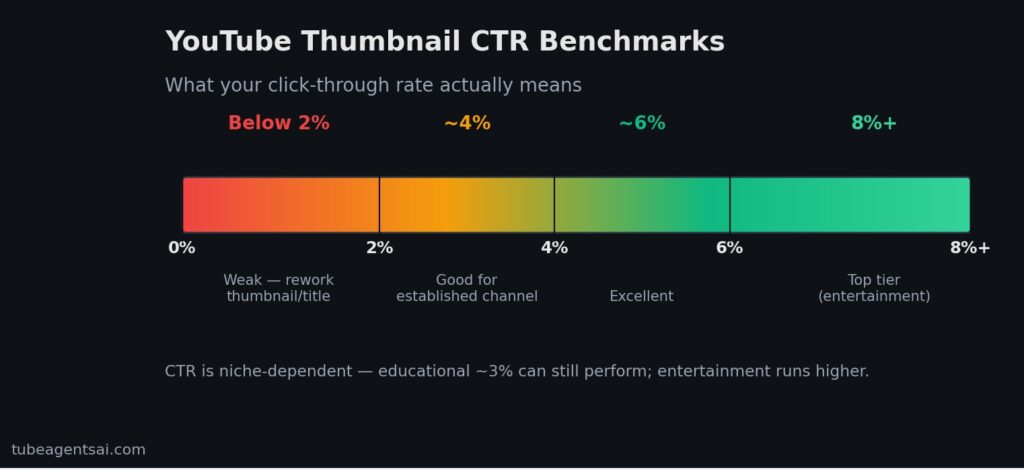
Click-Through Rate (CTR) is the primary thumbnail metric. YouTube Studio shows CTR per video in the Reach tab. A CTR above 4% is generally considered good for an established channel; above 6% is excellent; below 2% suggests the thumbnail or title isn’t compelling enough for the audience it’s being shown to. CTR is highly niche-dependent — entertainment channels often run above 8%, while educational channels in competitive niches might run at 3% and still perform well.
Impressions tell you how often YouTube is showing your video in feeds and search. Low impressions combined with good CTR means your video is performing well when shown but not being distributed widely — usually a content or SEO issue rather than a thumbnail issue. High impressions with low CTR is almost always a thumbnail or title problem. The AI script generation guide and our post on AI voiceover for YouTube cover the content and production factors that affect impressions separately from thumbnail CTR.
A/B thumbnail testing is available through YouTube’s built-in Test & Compare feature (available to channels with sufficient traffic) and through third-party tools like TubeBuddy’s A/B testing. If you have the traffic to run tests, testing two thumbnail variants on the same video provides direct, comparable data on which visual approach drives more clicks from the same audience. Run tests for at least two weeks before drawing conclusions — short test windows can be misleading due to algorithmic variation in who gets shown the video.
For channels in the earlier stages building both content volume and thumbnail strategy together, the most efficient approach is to apply consistent principles, track CTR per video, identify your three lowest performers each month, and redesign their thumbnails. This iterative approach compounds over time — as your channel grows, you’ll build genuine data about what your specific audience responds to, which is more valuable than any general best practice. Combined with the batch creation workflow from our guide on producing 30 videos per month with AI and the Shorts strategy covered in faceless Shorts automation, thumbnail optimization becomes one consistent layer in a broader system rather than a one-off task. And the foundation of that system — from scripts to voiceover to thumbnails — is what the 7-agent Telegram bot was built to automate end to end.
Conclusion: Use an AI Thumbnail Generator for YouTube and Stop Leaving Clicks on the Table
The gap between a video that gets clicked and one that doesn’t often has nothing to do with the content inside it. An AI thumbnail generator for YouTube removes the design skill barrier that keeps good videos invisible — and in 2026, the tools are genuinely good enough to produce professional results without a graphic design background or hours of manual work.
The most efficient workflow combines @AIYouTubeConveyerBot for automatic thumbnail briefs with Canva AI or Midjourney for image generation — giving you a complete, CTR-optimized thumbnail in under ten minutes per video. At batch scale, that’s the difference between thumbnails being a bottleneck and thumbnails being just another step in a smooth production pipeline.
👉 Try @AIYouTubeConveyerBot free on Telegram — get your first thumbnail brief, script, and SEO package delivered automatically for any video topic.