Ask any active YouTube creator what their tool stack looks like and you’ll hear a familiar list: one tool for keyword research, another for scripts, a third for voiceover, a fourth for thumbnails, a fifth for SEO metadata, and maybe a sixth for scheduling. Each of those tools has its own subscription, its own login, its own learning curve, and its own interface. The question that keeps coming up in creator communities in 2026 is whether a genuine all-in-one AI tool for YouTube actually exists — or whether the “all-in-one” label is just marketing for something that handles two or three steps and calls it complete. This article gives an honest answer.
What Creators Actually Need (The Full YouTube Production Stack)
Before evaluating any tool, it’s worth being precise about what “all-in-one” would actually need to cover. A complete YouTube production pipeline for a solo creator consists of more components than most tool comparisons acknowledge.
Research and ideation: identifying video topics with search demand, validating keywords, and understanding what’s already ranking in a given niche. This is the foundation that everything downstream depends on.
Script generation: turning a topic and keyword into a complete, recordable script with a strong hook, structured body, and clear CTA. Format varies significantly between long-form and Shorts. We’ve covered this in depth in our guide on generating YouTube scripts automatically with AI.
Voiceover: converting the script into high-quality audio. For faceless channels, this is the primary production step — the equivalent of filming for on-camera creators. The options and quality benchmarks are covered in our AI voiceover for YouTube guide.
Thumbnail creation: generating a visual asset with strong CTR potential, including a brief, a background image concept, and text overlay. The tools and workflow are detailed in our breakdown of AI thumbnail generators for YouTube.
SEO metadata: producing an optimized title, description, and tag set informed by the actual video content. The mechanics and AI automation approach are covered in our article on YouTube SEO automation.
Scheduling and publishing: uploading to YouTube Studio with correct settings, scheduling at optimal times, and managing content calendars for batch-produced videos.
That’s six distinct functional areas. Most tools marketed as “all-in-one” cover two or three of them well and handle the rest superficially or not at all.
The Problem with Using 6 Different AI Tools
The obvious argument for using specialized tools is quality: the best voiceover tool produces better audio than a generalist platform’s voiceover feature, the best SEO tool has more keyword data than a script generator’s SEO addon. This argument is largely correct. Specialized tools do tend to outperform the equivalent feature in a generalist platform on their specific task.
The less obvious argument against fragmented tooling is context loss. When each step of your production pipeline lives in a different tool, each tool operates without awareness of what came before or after it. Your SEO tool doesn’t know what’s in your script. Your thumbnail generator doesn’t know what your title is. Your voiceover tool doesn’t know the emotional arc of your content. Each tool produces technically correct output, but the outputs don’t reinforce each other because they were generated in isolation.
The practical costs are also significant. Six tool subscriptions at even $10–15/month each is $60–90/month before any production software. Six interfaces to maintain means six separate workflows to execute, six sets of login credentials, and six potential points of service interruption. For a solo creator or a small team running a faceless channel at scale — as covered in our guide to batch creating 30 videos per month with AI — context switching between six tools per video multiplies the overhead at exactly the point where you need the workflow to be fast.
There’s also the cognitive overhead of managing multiple tools over time: keeping up with feature updates across six platforms, troubleshooting when one breaks mid-production, and re-evaluating the stack every time a better alternative emerges in one category. This ongoing maintenance cost is rarely factored into tool comparisons but adds up significantly over months.
What a True All-in-One AI Tool for YouTube Would Look Like
If you were designing the ideal integrated YouTube AI tool from scratch, it would have several properties that most current tools lack.
Context persistence across steps. The tool would carry information from one production step to the next automatically. The keyword identified in research informs the script structure. The script’s hook and main topics inform the title options. The title and script together inform the thumbnail brief. The full content package informs the description. Nothing gets generated in isolation — every output is informed by every input that came before it.
A single interface for the complete session. The creator submits a topic and preferences once. The tool handles all subsequent steps internally, returning a complete content package rather than requiring the creator to shuttle between interfaces. The interface should be low-friction — ideally something that requires no installation, no complex setup, and no steep learning curve.
Output quality sufficient for production use at each step. “All-in-one” is only useful if the quality at each step is actually usable. A tool that produces excellent scripts but generates generic SEO metadata, or strong titles but weak voiceover notes, forces the creator back to specialized tools anyway — which defeats the purpose of integration.
Scalability for batch production. The tool should handle multiple video requests in a session, not just one at a time. Batch creation is how consistent channels are built in 2026, and a tool that requires five minutes of setup per video before generating anything isn’t designed for scale.
No tool on the market in 2026 hits all four of these criteria perfectly. But one comes noticeably closer than the alternatives.
How @AIYouTubeConveyerBot Comes Closest to All-in-One
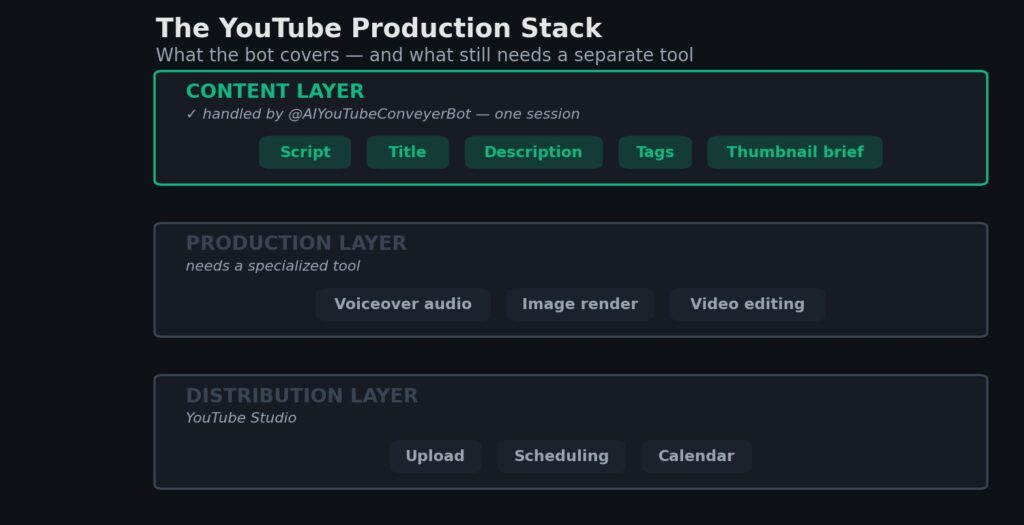
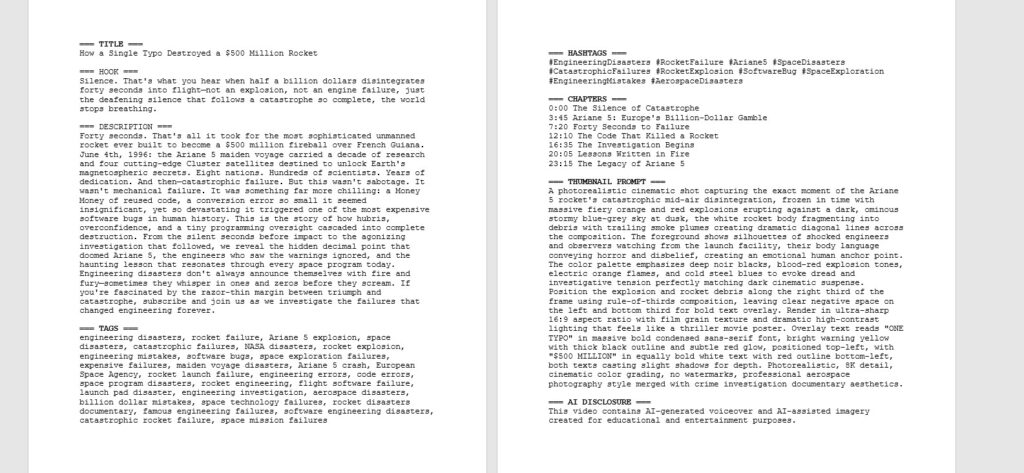
@AIYouTubeConveyerBot is a Telegram-based automation bot built around a multi-agent architecture — meaning different AI agents handle different production steps internally, and the outputs are coordinated before being delivered to the creator. The practical result is that a single topic input generates a content package containing: a complete script, a thumbnail brief with visual concept and text overlay, an optimized title, an SEO description, a tag set, and voiceover pacing notes.
The architecture behind this — how multiple AI agents work in parallel on different pipeline steps — is explained in detail in our post on building a 7-agent Telegram bot for YouTube automation. The key point for this evaluation is that the integration is genuine: the script agent and the SEO agent share context, which is why the description consistently reflects what’s actually in the script rather than producing a generic topic summary.
What the bot doesn’t do is worth being equally clear about. It doesn’t generate final audio files — you still need a dedicated voiceover tool like ElevenLabs or Play.ht for the actual audio production. It doesn’t produce finished thumbnail image files — it produces a brief that you take into Canva AI or Midjourney. It doesn’t upload to YouTube or manage your content calendar. And it doesn’t include keyword research data from external YouTube analytics APIs — the keyword optimization is AI-informed rather than data-driven from a tool like VidIQ or TubeBuddy.
The honest framing: it’s a strong all-in-one for the content generation layer of the pipeline (script, title, description, tags, thumbnail brief), and it’s intentionally not trying to replace the production layer (audio rendering, image generation, video editing) or the distribution layer (YouTube Studio, scheduling).
Honest Comparison: Bot vs Separate Tools (Time, Cost, Output Quality)
Here’s a direct comparison across the three dimensions that matter most for creators evaluating their tooling decisions.
Time Per Video
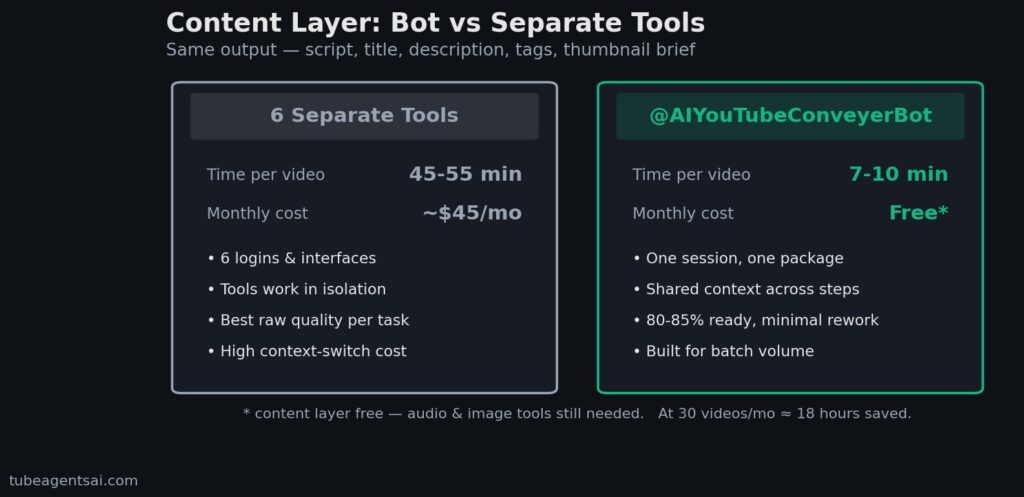
Separate tools: Keyword research (15–20 min) + script generation (5–10 min in a dedicated tool, plus review) + title generation (5 min) + description drafting (10 min) + tag research (5 min) + thumbnail brief (5 min) = 45–55 minutes of active work per video before any production.
@AIYouTubeConveyerBot: Topic input + bot generation (2–3 min) + review of complete package (5–7 min) = 7–10 minutes per video for the same output. The time saving is real and compounds significantly at batch scale — the difference between 45 minutes and 8 minutes per video across 30 videos is roughly 18 hours per month.
Monthly Cost
Separate tools: A reasonable minimum viable stack — VidIQ Basic ($10/month), ChatGPT Plus or Claude Pro for scripts ($20/month), ElevenLabs Starter ($5/month), Midjourney Basic ($10/month) — totals $45/month before any video editing software.
@AIYouTubeConveyerBot: The bot is free to use on Telegram, which makes the cost comparison straightforward for creators at the beginning of their channel-building journey. You’d still need a voiceover tool and an image generator for production, but the content generation and SEO layer is covered without additional subscription cost.
Output Quality
This is where the honest answer requires nuance. For script quality specifically, a dedicated prompting session with a frontier AI model will often produce a more refined first draft than the bot’s script output — if you invest the time in prompt engineering and iteration. For SEO metadata quality, a tool with access to real YouTube keyword data (VidIQ, TubeBuddy) will surface more precisely validated keyword opportunities than AI-estimated relevance.
The bot’s output quality is consistently good enough for production use without significant revision — which is the relevant benchmark for high-volume content creation. If you’re producing two videos a month and spending three hours perfecting each one, the specialized tool stack is the right choice. If you’re producing thirty videos a month and need each content package to be 80–85% ready without extensive rework, the integrated bot approach wins on practical grounds.
Real-world results on a faceless channel using the bot’s full pipeline are covered in our review of the best AI bots for faceless YouTube channels. The Shorts automation guide also documents the workflow specifically for short-form content at high volume.
Who This Is For (and Who It’s Not)
@AIYouTubeConveyerBot is a strong fit for: creators building faceless channels who need to produce consistently at volume, new creators who want to start publishing without investing in a complex multi-tool stack, and established creators who want to reduce per-video production time without sacrificing content quality. It’s particularly well-suited to the batch creation approach — submitting multiple topics in one session and receiving complete content packages for each.
It’s probably not the right primary tool for: creators who rely heavily on trend-based keyword research with real-time YouTube data, channels where the script quality needs to be highly personalized and heavily revised before recording, and creators who already have a functioning multi-tool stack they’re happy with and see no reason to change. If you’re already producing efficiently with your current setup, switching systems has a real transition cost that needs to be weighed against the marginal gains.
The honest answer to the title question — does a true all-in-one AI tool for YouTube exist in 2026 — is: not quite, but closer than it’s ever been. The production layer (audio, video, image rendering) still requires specialized tools, and likely always will given how compute-intensive those tasks are. But the content generation and SEO layer — scripts, titles, descriptions, tags, thumbnail briefs — can now be handled in a single integrated session in a way that wasn’t possible even 18 months ago. That’s a meaningful shift for solo creators who previously had to choose between quality and speed.
Conclusion: The All-in-One AI Tool for YouTube Is Getting Real
The search for a single all-in-one AI tool for YouTube that handles every production step is worth having — not because such a tool fully exists yet, but because it clarifies what you actually need from your tooling at each stage of your channel’s development. For the content generation and SEO layer, integrated tools have become genuinely viable. For the production and distribution layers, specialized tools remain the stronger choice.
The most efficient 2026 stack combines the two: an integrated bot for content generation (one session, one output package per video), specialized tools for audio and visual production, and YouTube Studio for scheduling. That stack is leaner, faster, and cheaper than six separate AI subscriptions — and for high-volume faceless channels, it’s the difference between sustainable output and constant tool maintenance.
👉 Try @AIYouTubeConveyerBot free on Telegram — submit a topic and see what a complete, integrated content package looks like before committing to any stack decision.