
Most YouTube channels don’t fail because of bad content. They fail because posting stops. A creator publishes five great videos, goes quiet for six weeks, loses momentum, and never recovers the algorithm’s attention. The fix isn’t willpower — it’s a system. The creators who consistently publish one video per day, or thirty videos per month, aren’t working harder than everyone else. They’ve learned to batch create YouTube videos with AI, front-loading production at scale so publishing becomes a scheduling task rather than a daily creative grind. This article breaks down exactly how that system works.
Why Batch Creation Is the Secret of Prolific YouTube Channels
Batch creation is the practice of producing multiple pieces of content in a single focused session rather than one video at a time. It’s not a new idea — podcasters, bloggers, and newsletter writers have used it for years. On YouTube, it’s particularly powerful because the platform’s algorithm actively rewards channels that maintain consistent upload schedules over those that post sporadically, regardless of quality.
The psychological argument for batching is straightforward. Every time you sit down to make a video, you pay a setup cost — getting into the creative mindset, re-familiarizing yourself with your tools, deciding on a topic, warming up your workflow. When you make one video at a time, you pay that setup cost every single day. When you batch, you pay it once and then stay in flow state for an extended session, producing five or ten videos for the same mental overhead as one.
The practical argument is even stronger. A batch-creation workflow separates the creative phase (ideation, scripting) from the production phase (voiceover, assembly) from the publishing phase (scheduling, SEO). Each phase requires a different kind of attention, and context-switching between them daily is exhausting. Batching means you spend Monday writing, Wednesday recording, Friday editing — each day fully focused on one type of work, not all of them simultaneously.
Add AI to this equation and the math changes entirely. When an AI tool can generate a script in two minutes instead of three hours, the bottleneck shifts from content creation to content assembly — and assembly scales linearly in ways that writing never did.
The Math: How 30 Videos Per Month Is Actually Possible
Thirty videos per month sounds extreme until you break it down. That’s roughly one video per day — but “one video per day” doesn’t mean spending one full day per video. Here’s what the actual time investment looks like with an AI-assisted workflow.
A short-to-mid-length YouTube video (5–10 minutes, or a 45-second Short) requires four production components: a script, a voiceover, visuals, and metadata (title, description, tags). With AI handling scripts and metadata, and stock footage libraries handling visuals, the human work reduces to assembly and quality review.
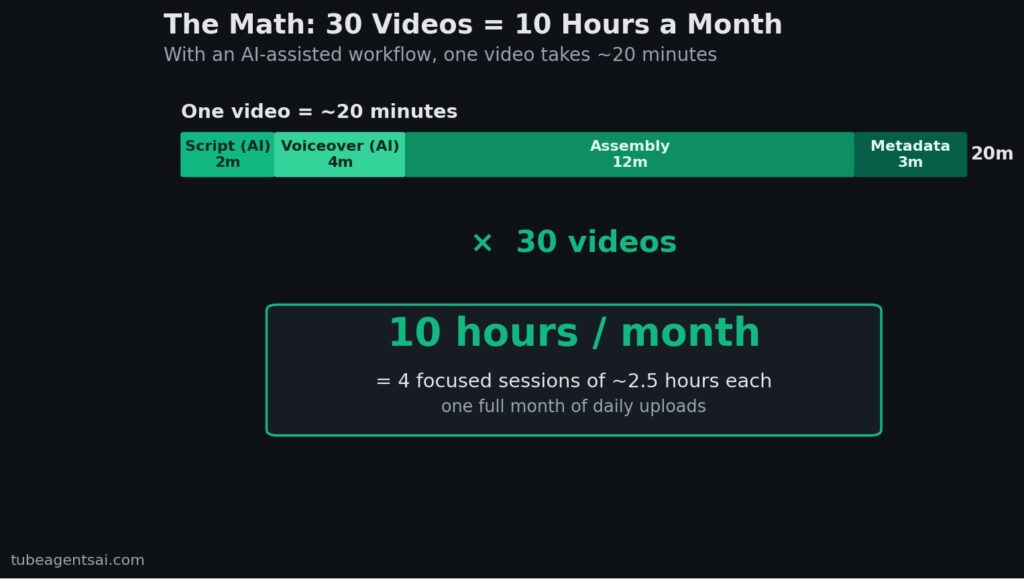
Estimated time per video with an AI workflow: script generation (2–3 minutes), voiceover generation (3–4 minutes), assembly in a pre-built template (10–15 minutes), metadata upload (3 minutes). Total: roughly 20 minutes per video. Thirty videos at 20 minutes each is 600 minutes — exactly ten hours. Spread across four weekly sessions of 2.5 hours each, that’s a completely realistic monthly commitment for a solo creator.
The caveat: those time estimates assume you have a working system, a pre-built editor template, and reliable AI tools that produce usable output without heavy revision. Getting there requires some upfront investment in setup. But once the system is running, ten hours a month for thirty videos is genuinely achievable — and many creators are already doing it.
Your Complete Batch Creation Workflow with AI
A reliable batch creation system has four distinct phases, each handled separately and sequentially. Here’s how each one works in an AI-assisted pipeline.
Phase 1: Topic and Keyword Planning (Once Per Month)
Before you generate a single script, spend one focused session — roughly 60–90 minutes — planning your entire month of topics. Use YouTube search suggestions, Google Trends, and tools like VidIQ or TubeBuddy to identify 30 topics that have search demand in your niche. Build a simple spreadsheet: column one is the topic, column two is the target keyword, column three is the format (long-form or Short). This planning session is the only strategic work in the entire workflow. Everything else is execution.
Phase 2: Batch Script Generation
With your topic list ready, feed all 30 topics into your AI script tool in a single session. Using a tool like @AIYouTubeConveyerBot, you can send topics in sequence and receive scripts back within minutes each. By the end of a two-hour script session, you have 30 complete, review-ready scripts. Check each one briefly — fix any obvious errors, add personal examples where relevant, adjust tone if needed — and move them into a numbered folder. For a detailed breakdown of AI script generation, see our guide on how to generate YouTube scripts automatically with AI.
Phase 3: Batch Voiceover Generation
With 30 scripts ready, process all voiceovers in one session. Open your AI voice tool — ElevenLabs, Murf, or Play.ht work well for this — and work through scripts sequentially. Generate, preview, download, next. At 3–4 minutes per script, 30 voiceovers take about two hours. Name each file to match your script numbering. Our complete comparison of AI voiceover tools is covered in the AI voiceover for YouTube guide if you need help choosing the right one for your niche.
Phase 4: Batch Assembly
Assembly is the most time-intensive phase, but a pre-built template reduces it significantly. Create one master template in your video editor — vertical for Shorts, horizontal for long-form — with your preferred fonts, colors, transitions, and outro card already set up. For each video, drop in the voiceover, pull matching stock footage from Pexels or Storyblocks, sync cuts to audio, add auto-captions, and export. With an established template, each video takes 10–15 minutes to assemble.
How @AIYouTubeConveyerBot Makes Batch Creation Simple
The biggest friction point in a batch creation workflow isn’t any single step — it’s the coordination overhead between steps. Switching between a script tool, a voiceover tool, an SEO tool, and a video editor for every single video multiplies the mental load significantly. This is where @AIYouTubeConveyerBot on Telegram changes the equation.
Rather than operating as a single-function AI tool, the bot handles multiple pipeline steps in one session. You send a topic, and within minutes you receive: a complete script formatted for your video length, voiceover pacing notes, an optimized title, a search-friendly description, and a set of relevant tags. The entire asset package for one video, delivered together.
For batch creation specifically, this means your Phase 2 and metadata preparation happen simultaneously. You’re not generating scripts and then separately building SEO metadata — they arrive together, ready to be dropped into your upload workflow at the end of production. This integration is what the 7-agent Telegram bot architecture was specifically designed to enable — parallel processing across the full content stack rather than sequential single-task execution.
For creators building faceless channels specifically — where the entire production is AI and stock assets — the bot covers the majority of active work, reducing the human role to quality review and final assembly. Our review of the best AI bots for faceless YouTube channels benchmarks this against other tools if you want to see how the outputs compare in practice.
Weekly Schedule: Batch Creating 30 Videos in 4 Sessions
Here’s what a realistic four-session monthly batch schedule looks like in practice. This assumes a mixed format channel with both long-form videos and Shorts.
Session 1 — Monday Morning (2.5 hours): Planning + Script Generation
Spend the first 45 minutes finalizing your 30 topics for the month using your keyword research. Then open @AIYouTubeConveyerBot and work through all 30 topics, sending them in batches. By the end of the session, you have 30 scripts with titles, descriptions, and tags. Review each one for quality — aim for 15–20 minutes on review — and organize everything in a numbered folder. This is the highest-leverage session in the entire month. Everything downstream depends on the quality of what you produce here.
Session 2 — Wednesday Morning (2 hours): Voiceover Generation
Work through all 30 scripts and generate voiceovers for each one. Process them in order, naming each file to match the script number. If any voiceover has a mispronounced word or awkward pacing, fix it immediately rather than flagging it for later — later never comes in batch workflows. By the end of this session, you have 30 audio files numbered and organized, ready for assembly.
Session 3 — Friday Morning (3 hours): Assembly
Open your video editor with the master template pre-loaded. Work through videos in order: drop in audio, source visuals, sync cuts, export. Aim for 15 videos in this session — roughly 10–12 minutes per video with a solid template. Don’t try to perfect each one. Good and consistent beats occasionally great. Export each video as you complete it rather than queuing them all and exporting at the end, which can create bottlenecks.
Session 4 — Saturday Morning (2.5 hours): Assembly + Scheduling
Complete the remaining 15 videos and handle all uploads in this session. Use YouTube Studio’s bulk upload feature to drop in multiple videos simultaneously. For each video, paste the pre-generated title, description, and tags from your bot output. Set your publishing schedule — stagger uploads to maintain daily or every-other-day frequency. For Shorts strategy and scheduling tips specifically, our guide on faceless YouTube Shorts automation covers the scheduling approach in detail.
Total active time for 30 videos: approximately 10 hours across four sessions, spread over one week at the start of each month. The rest of the month is hands-off publishing.
Tools You Need (and Tools You Don’t)
One of the most common mistakes in building a batch workflow is over-tooling. Creators sign up for eight different subscriptions, spend two weeks “researching” options, and never actually start producing. Here’s what you genuinely need versus what’s optional or unnecessary.
Essential tools:
An AI script and SEO tool — @AIYouTubeConveyerBot handles this in one place, covering scripts, titles, descriptions, and tags without requiring separate subscriptions for each function.
An AI voiceover tool — ElevenLabs Starter ($5/month) is enough for most channels at 30 videos per month. Murf and Play.ht are solid alternatives depending on your format and language needs.
A video editor with template support — CapCut (free) for Shorts-heavy channels; DaVinci Resolve (free) or Adobe Premiere for long-form. The specific tool matters less than having a saved template you can load instantly.
A stock footage library — Pexels and Pixabay are entirely free and have enough material for most niches. Storyblocks ($15/month) is worth it if you’re publishing in a visually demanding niche like travel, nature, or premium lifestyle content.
Tools you probably don’t need yet:
An AI thumbnail generator (design a simple reusable template in Canva first), a dedicated SEO analytics platform (YouTube Studio’s built-in analytics is sufficient for the first six months), and any tool that promises to automate the upload process (YouTube’s own scheduling feature handles this perfectly well).
The goal in the first month is to complete the batch workflow, not to optimize it. Use the minimum viable toolset, produce your 30 videos, review what worked, and add complexity only when a specific bottleneck makes a clear case for a new tool.
Conclusion: Batch Create YouTube Videos with AI and Build a Channel That Lasts
Consistency is the most underrated factor in YouTube growth — more important than production quality, more important than thumbnail design, more important than posting time. A channel that publishes reliably every day for six months will outperform a channel that posts sporadically with better videos every single time. The only sustainable path to that consistency is a system that removes the daily decision-making and creative friction from the process.
When you batch create YouTube videos with AI, you shift from being a daily content producer to being a monthly content manufacturer. You make the creative decisions once — topics, tone, format — and then execute them systematically. The AI handles the labor-intensive parts: scripts, voiceovers, metadata. You handle the judgment calls: quality review, visual selection, final approval. The result is thirty videos published per month at a cost of ten hours of focused work.
That’s not a theoretical system. It’s what creators are already running in 2026 — and the ones who build this workflow in the next ninety days will have a significant head start on everyone still making one video at a time.
👉 Try @AIYouTubeConveyerBot free on Telegram — start your first batch session and get 10 scripts with full SEO metadata in under 30 minutes.