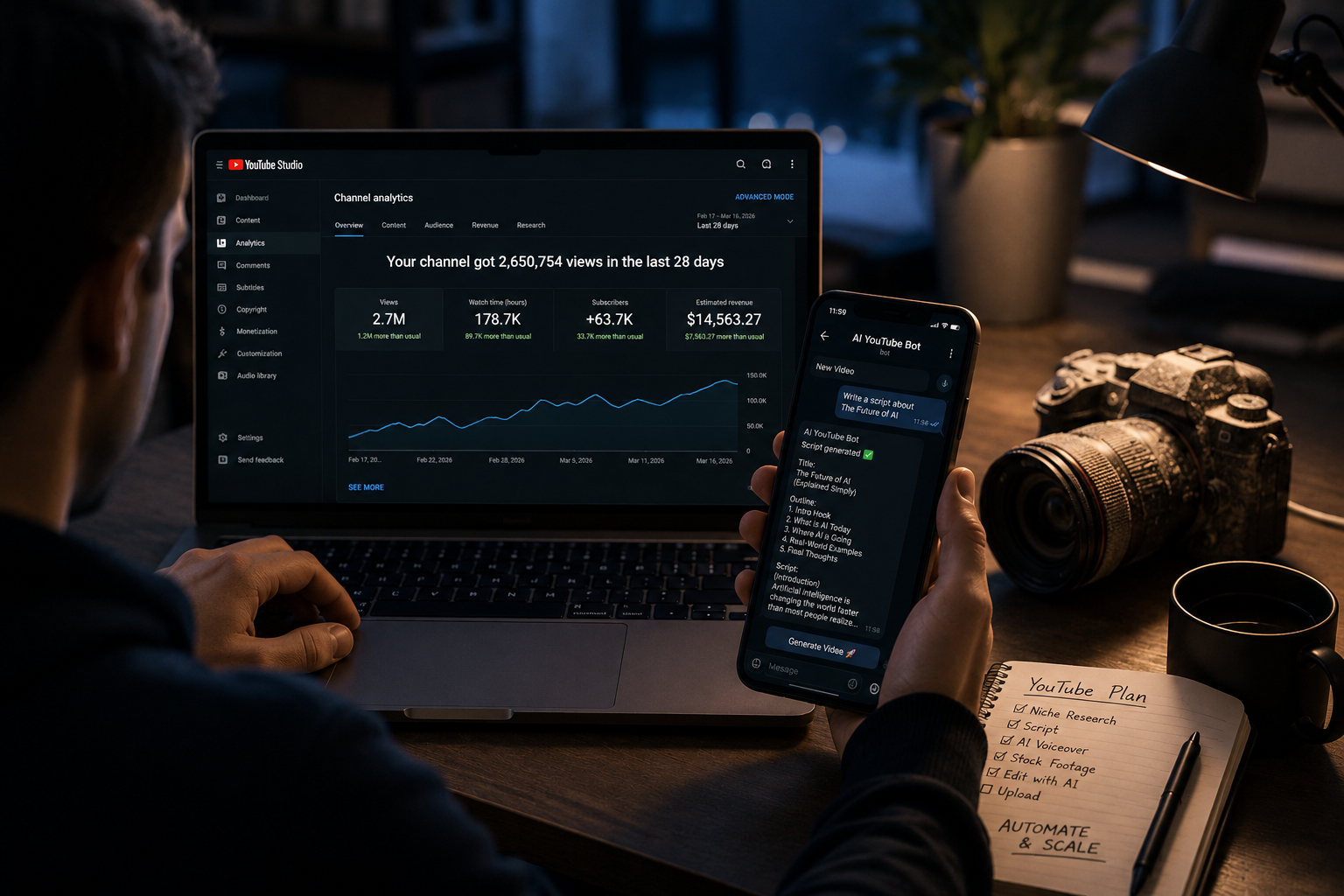
Tens of millions of people want to build a YouTube channel. Most of them never publish a single video — not because they lack ideas, but because the camera feels like a wall they can’t get over. No face on screen, no professional mic, no experience in front of an audience, no expensive editing software. In 2026, none of these are actual barriers anymore. You can start a faceless YouTube channel with AI and publish your first video without showing your face, recording your voice, or having any prior content creation experience. This guide walks you through exactly how — step by step, no hype.
Why Faceless Channels Are Exploding in 2026
The faceless channel format has existed for years — narrated documentaries, animated explainers, and screen-recording tutorials have been popular since YouTube’s early days. What’s changed in 2026 is the infrastructure available to solo creators. AI voiceover tools have reached human-level quality. AI script generators produce structured, platform-optimized content in minutes. Stock footage libraries have deep enough catalogs to support almost any niche. And automation bots can handle the entire content generation layer from a single Telegram message.
The result is that a format that previously required a small production team — a writer, a voiceover artist, a video editor — can now be run by one person working part-time. The channels growing fastest in niches like AI news, finance, history, and motivational content are frequently faceless, frequently AI-assisted, and frequently operated by solo creators who started with no YouTube experience.
This isn’t a get-rich-quick scenario. Building a channel that generates meaningful income takes months of consistent publishing. But the path is genuinely accessible in a way it wasn’t before — and the tools available in 2026 remove the production barriers that stopped most people from even starting. Our comparison of the best AI bots for faceless YouTube channels goes deeper on what the tool landscape looks like for established operators, but this guide starts at the beginning.
Step 1: Choose Your Niche (The Right Way)
Niche selection is the most important decision you’ll make before publishing a single video — and it’s also where most beginners make their biggest mistake. The instinct is to choose something you’re personally passionate about. That’s not wrong, but passion alone isn’t a niche strategy.
A viable faceless YouTube niche needs three things simultaneously: enough search demand to support consistent traffic, a content format that works without original footage (stock video, screen recordings, animations, or AI-generated visuals), and a level of competition you can realistically compete in as a new channel.
Some niches that consistently meet all three criteria for faceless channels in 2026: AI tools and technology news (high demand, rapidly refreshing content, works well with screen recordings), personal finance and money tips (strong search intent, evergreen content, stock footage works perfectly), history and unsolved mysteries (visually flexible, highly engaging, repeatably scriptable), motivational and mindset content (broad appeal, short-form friendly, stock footage sufficient), and productivity and workflow optimization (growing audience, software screenshot format works well).
One practical validation step before committing: search your chosen niche on YouTube and look at the top channels. Are any of them faceless? Do any have under 100,000 subscribers but still get consistent views per video? If yes, the niche is viable. If every top result is a massive established channel with millions of subscribers and years of history, you may need to narrow your angle.
Step 2: Set Up Your AI Production Stack
You don’t need all your tools in place before publishing your first video. You need a minimum viable stack that lets you go from topic to published video in a single session. Here’s what that looks like.
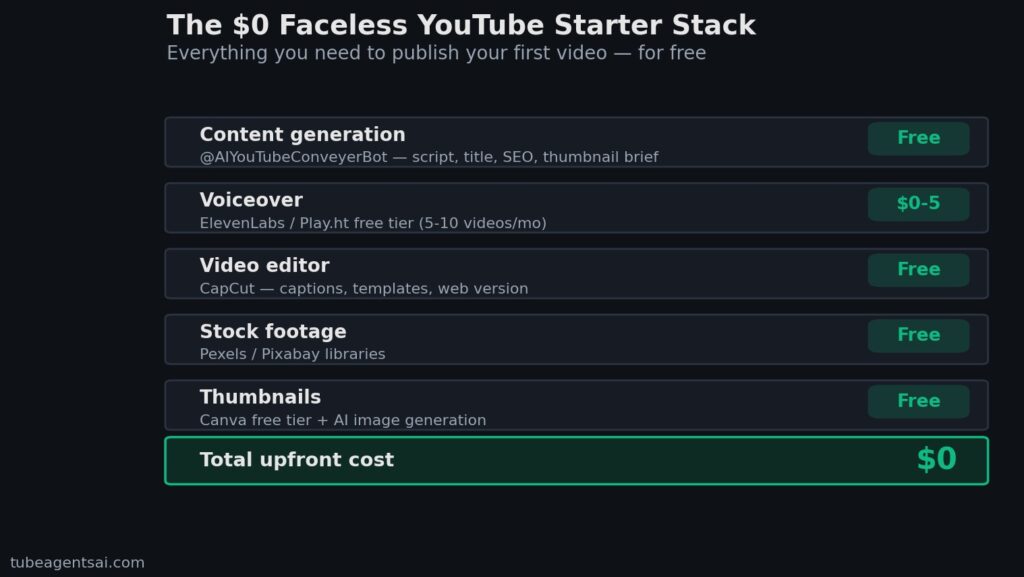
Content generation (free): @AIYouTubeConveyerBot on Telegram handles scripts, titles, descriptions, tags, and thumbnail briefs in one session. This replaces a keyword tool, a script tool, and an SEO tool simultaneously. For a breakdown of how the bot compares to using separate specialized tools, see our analysis of all-in-one AI tools for YouTube.
Voiceover ($0–$5/month to start): ElevenLabs free tier gives you enough monthly characters to produce 5–10 videos. For more volume, the Starter plan at $5/month covers a consistent publishing schedule. The full tool comparison and workflow for AI voiceover is covered in our AI voiceover for YouTube guide.
Video editor (free): CapCut handles both Shorts and long-form videos, includes auto-captions, and has pre-built templates for YouTube formats. It’s free, requires no installation (web version available), and has a short enough learning curve that you can produce your first video on the same day you install it.
Stock footage (free): Pexels and Pixabay both have extensive free libraries. For most niches, the free tier is sufficient for the first three to six months of channel building.
Thumbnails (free): Canva’s free tier includes YouTube thumbnail templates and basic AI image generation. Create one reusable template in your first session and use it across all videos to build visual brand consistency. For more advanced thumbnail workflows, see our guide to AI thumbnail generators for YouTube.
Total upfront cost of this stack: zero. Total monthly cost at the free tier: zero. You can begin publishing immediately.
Step 3: Create Your First Video with @AIYouTubeConveyerBot
Here’s what the actual first-video production session looks like using the bot as the core of your workflow.
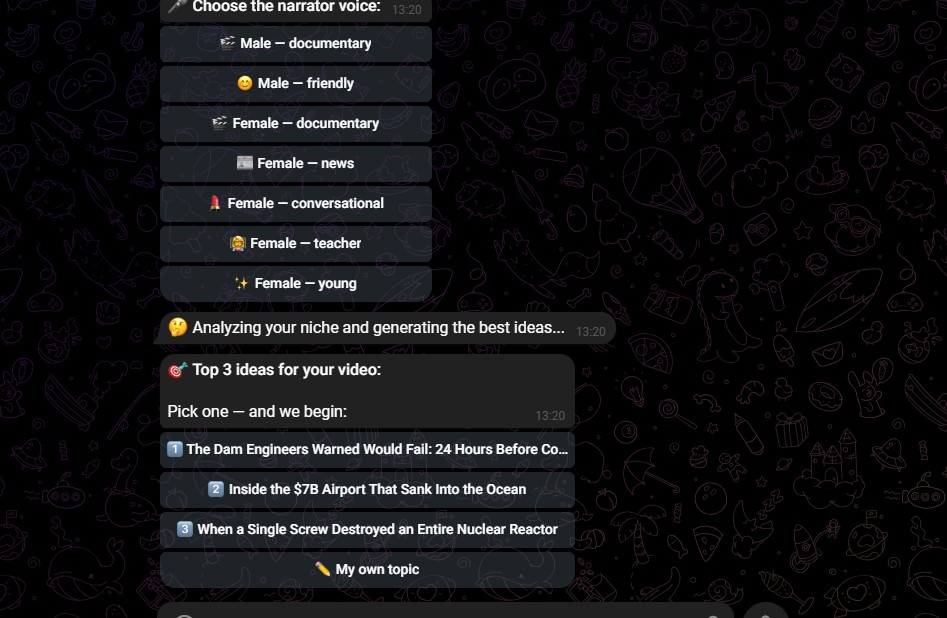
Open Telegram and search for @AIYouTubeConveyerBot. Send it your video topic along with a brief: your niche, your target audience, the desired video length (long-form or Shorts), and the tone you want (educational, conversational, motivational). Be specific — “AI tools for freelancers, beginner audience, 8-minute video, conversational tone” will produce a substantially better script than just “AI tools.”
Within a few minutes, you’ll receive: a complete script with hook, structured body, and CTA; an optimized video title with your target keyword; a 250–300 word SEO description; a tag set; and a thumbnail brief with a visual concept and three-to-five-word text overlay suggestion.
Review each element quickly. The script typically needs minor adjustments — add a personal example, swap a phrase that feels unnatural, cut anything that runs long. The SEO metadata usually needs no editing and can be copied directly into YouTube Studio. Total review time: 5–10 minutes. The full workflow for script generation — including how to structure prompts for different video formats — is covered in our guide on generating YouTube scripts automatically with AI.
Next, take the reviewed script to ElevenLabs and generate your voiceover. Select a voice that matches your niche tone (calm and authoritative for finance, upbeat for tech, warm for motivational). Generate, preview the first 30 seconds, make any phrasing adjustments if needed, and download the audio file.
Open CapCut, create a new project in the correct format (16:9 for long-form, 9:16 for Shorts), drop in your audio, pull matching stock footage from Pexels, sync cuts to the audio, add auto-captions, and export. For your first video, plan for 45–60 minutes on this step. With practice and a saved template, it drops to 15–20 minutes.
Step 4: Upload, Optimize, Publish
Upload your finished video to YouTube Studio. Paste the bot-generated title, description, and tags directly into their respective fields. Upload the thumbnail you created in Canva. Set your video category, language, and whether it’s made for kids (it isn’t, for most creator niches).
One thing most beginners skip: chapters. If your video is longer than 5 minutes, adding timestamps in the description (formatted as “0:00 – Intro”, “1:20 – Main Topic”, etc.) improves the viewing experience and signals to YouTube that your video has structured, substantive content. Add them manually from your script — it takes three minutes and is worth it for the UX signal.
For your first video, publish immediately rather than scheduling — you want to start observing real data as soon as possible. Once you’re batch creating, scheduling becomes important. The SEO mechanics behind title, description, and tag optimization are covered in depth in our YouTube SEO automation guide.
Step 5: Stay Consistent with Batch Creation
Your first video is not going to go viral. That’s normal, expected, and not a sign that the system isn’t working. YouTube channels build momentum over time — the algorithm needs data about your channel’s performance before it starts distributing your content more widely. The only thing that generates that data is consistent publishing.
This is why batch creation is the most important habit you can build after publishing your first video. Producing videos one at a time is exhausting and unsustainable. Producing them in weekly or monthly batches — generating all scripts in one session, all voiceovers in one session, all assembly in one session — is how you maintain a daily or every-other-day publishing schedule without burning out.
The full batch creation framework — including a weekly schedule for producing 30 videos per month in four sessions — is detailed in our guide on batch creating YouTube videos with AI. For Shorts specifically, the batch Shorts workflow is covered in our faceless YouTube Shorts automation guide.
Real Example: System Failure Channel (@System_Failure_4O4)
The best evidence that this workflow produces real results is a channel that’s actually using it.
System Failure (@System_Failure_4O4 on YouTube) is a faceless channel built using the @AIYouTubeConveyerBot pipeline. The channel covers AI, tech failures, and digital culture — a niche that fits the faceless format naturally, with screen recordings, stock footage, and AI voiceover as the primary production format.
The channel was launched without on-camera content, without a professional studio setup, and without a large team. Scripts, titles, descriptions, and thumbnail briefs are generated through the bot. Voiceover is handled through an AI voice tool. Assembly is done in a standard video editor using pre-built templates.
What System Failure demonstrates is that the AI-assisted faceless workflow isn’t a theoretical framework — it’s a production system that real channels are already running in 2026. The content is consistent, the SEO is functional, and the channel is growing on the same algorithm that everyone else is competing on. The full breakdown of how this kind of channel is built technically — including the multi-agent bot architecture that powers it — is covered in our post on building a 7-agent Telegram bot for YouTube automation.
Common Beginner Mistakes to Avoid
Waiting until everything is perfect before publishing. The most common reason new channels stall before they start is over-preparation. The first five videos you publish will not be your best work. They’re not supposed to be. They’re data collection — you’re learning what your audience responds to, what your workflow bottlenecks are, and what format your niche rewards. Publish imperfect work early. Improve from real feedback rather than hypothetical standards.
Picking a niche that’s too broad. “Technology” is not a niche. “AI tools for small business owners” is a niche. Broad niches mean competing with massive established channels for every keyword. Narrow niches mean smaller audiences but faster growth trajectories — and the ability to expand once you’ve built authority in a specific area.
Treating AI output as final output without review. AI tools generate first drafts, not finished products. A script that reads slightly off, a description that repeats itself, a tag set that includes irrelevant terms — these are easy to catch in a five-minute review and impossible to fix after publishing. Build review into every step of your workflow, not as an afterthought.
Neglecting thumbnails. New creators often put 90% of their effort into the video and five minutes into the thumbnail. Your thumbnail is what determines whether anyone clicks on the video in the first place. A mediocre video with a strong thumbnail will outperform a great video with a weak thumbnail in almost every case. Use the thumbnail brief from the bot, apply it consistently, and read our guide on AI thumbnail generation for the mechanics.
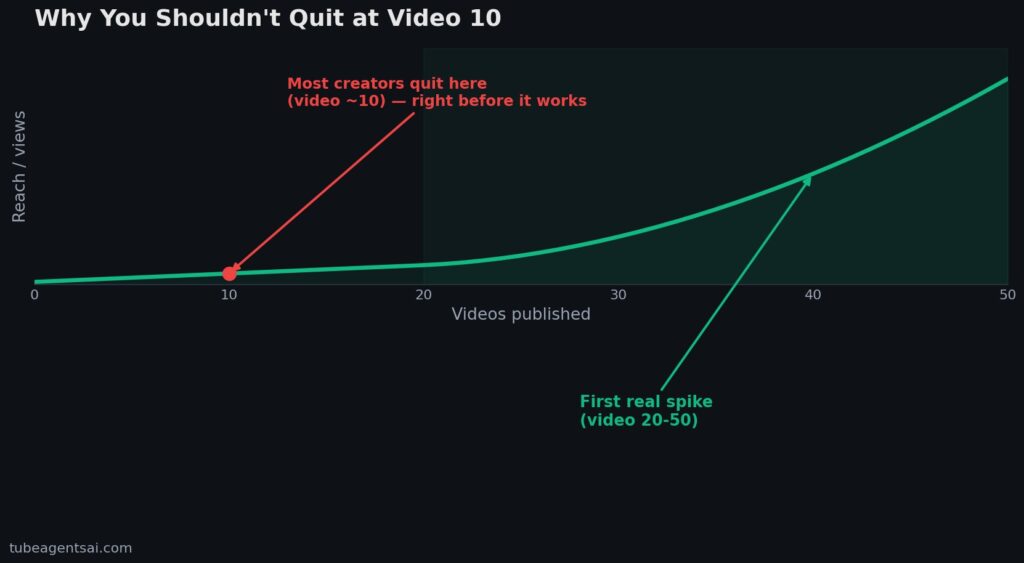
Giving up after thirty days. YouTube channel growth is not linear. Most channels see their first meaningful spike in views somewhere between video 20 and video 50 — after the algorithm has enough data to understand who the channel is for. Creators who quit at video 10 because “it’s not working” are quitting right before the system starts functioning. The batch creation workflow exists specifically to make it sustainable to publish consistently through the slow early phase without burning out.
Conclusion: Start Your Faceless YouTube Channel with AI Today
The information is all here. The tools are free or near-free. The workflow is proven. The only remaining variable is whether you actually start. That sounds obvious, but it’s the real bottleneck for most people reading guides like this — not lack of knowledge, but inertia.
If you can start a faceless YouTube channel with AI for zero upfront cost, produce your first video in a single afternoon, and have a complete batch creation system running within a week, then the question isn’t whether it’s possible. It’s whether you’re going to do it today or put it off for another month.
The channel you want to build in six months starts with the first video you publish this week. The AI handles the hardest parts. Everything else is up to you.
👉 Try @AIYouTubeConveyerBot free on Telegram — send your niche and first video topic, and get a complete script, SEO package, and thumbnail brief back in under five minutes.